fab-digital-twin
Parametric OpenUSD digital twin of a 300mm semiconductor fab, generated
entirely from a JSON spec — no GPU, no Omniverse licence required to build.
Runs anywhere usd-core installs (macOS/Linux/Windows); the output .usda
opens in usdview, Omniverse, or any USD-compatible viewer.
Built as a portfolio piece for an Omniverse Digital Factory Engineer role. It targets the three core responsibilities of that job with plain, testable Python:
| Job responsibility | Module |
|---|---|
| ① Digital-twin construction (USD 3D model) | fabtwin/builder.py — authors layered USD via the pxr API |
| ② Facility layout & material flow | fabtwin/layout.py — bay-and-chase solver + AMHS routing |
| ③ Capacity / process simulation & visualization | fabtwin/capacity.py — discrete-event WIP model + bottleneck analysis; fabtwin/dashboard.py, fabtwin/floorplan.py — SVG output |
Why OpenUSD, and why layers
The fab is authored as four .usda files composed by layer:
fab.usda            root twin  (metadata + subLayers, defaultPrim=/World)
  ├─ building.usda  cleanroom shell, floor, per-bay zoning tiles
  ├─ equipment.usda process tools grouped per bay (+ fab: metadata)
  └─ amhs.usda      overhead hoist track (OHT) loop + per-bay stockers
Each discipline (facilities / equipment / AMHS) owns a disjoint subtree under
/World, so teams edit in parallel and the twin composes non-destructively —
the reason fabs standardise on OpenUSD.
- Units & orientation:
metersPerUnit = 1, Z-up (semiconductor convention). - Equipment metadata: each bay carries
fab:processStep,fab:module,fab:toolCount,fab:capacityWphattributes — the hook for real custom USD schemas / Isaac Sim later.
Quick start
python3 -m venv .venv && ./.venv/bin/pip install -r requirements.txt
PYTHONPATH=src ./.venv/bin/python -m fabtwin build    --spec config/fab_spec.json --out out
PYTHONPATH=src ./.venv/bin/python -m fabtwin simulate --spec config/fab_spec.json --out out
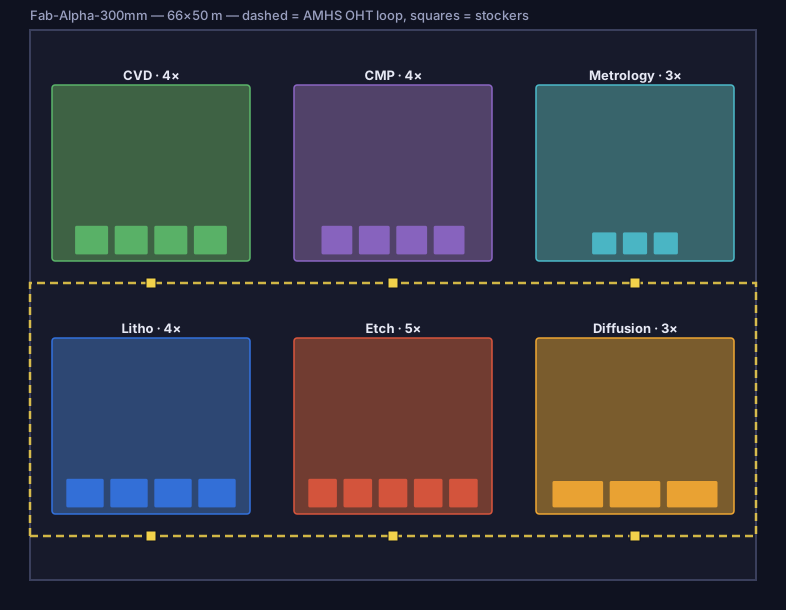
Outputs in out/: fab.usda (+ 3 sublayers) and floorplan.svg.
Open the twin:
usdview out/fab.usda          # if you have a full USD build
# or drop out/fab.usda into NVIDIA Omniverse / any USD viewer
The spec drives everything
config/fab_spec.json fully defines the cleanroom, the bay grid, the AMHS
track, and every process module (tool count, footprint, cycle time, rated
throughput). Nothing about the geometry is hard-coded — change the spec,
regenerate, and both the USD scene and the floor plan update together.
Capacity
The layout solver answers where everything goes. fabtwin simulate answers the
question a fab is actually judged on: how many wafers a day, and what is
stopping it from being more.
Lots of 25 wafers move through the route in step order, queue for a tool at each
bay, and ride the AMHS between bays. Transport time is not a parameter — it is
the arc length along the OHT loop layout.solve_layout produced, divided by
vehicle speed. The capacity model consumes the geometry rather than restating
it, which is the point of building the twin in the first place.
Two numbers are reported and they disagree on purpose. Analytic capacity is
tools × 3600 / cycle_time_s per step, the fab being the minimum of those: exact,
queue-free and unreachable. Simulated throughput is what the line delivers
once lots have to wait. The gap between them is the subject.
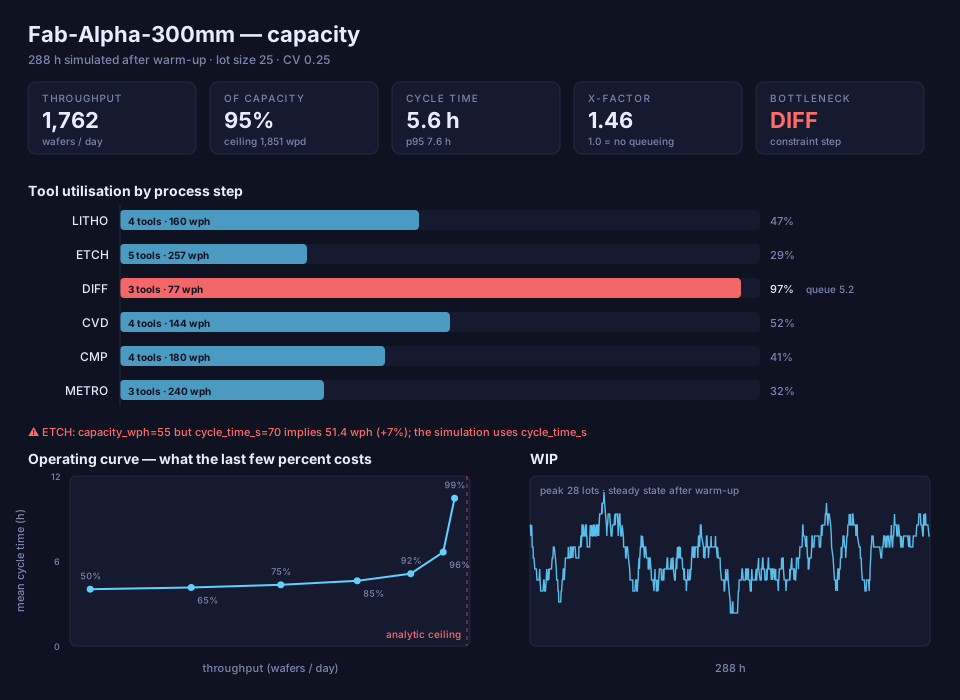
Ceiling:      1,851 wafers/day (analytic, no queueing) — constrained by DIFF
Throughput:   1,762 wafers/day (95.2% of ceiling)
Cycle time:   5.57 h mean, 7.61 h p95   X-factor 1.46

  LITHO  4 tools  util  46.6%  queue avg 0.03   ceiling 160.0 wph
  ETCH   5 tools  util  29.3%  queue avg 0.00   ceiling 257.1 wph
  DIFF   3 tools  util  97.0%  queue avg 5.22   ceiling  77.1 wph  <-- bottleneck
  CVD    4 tools  util  51.6%  queue avg 0.00   ceiling 144.0 wph
  CMP    4 tools  util  41.4%  queue avg 0.00   ceiling 180.0 wph
  METRO  3 tools  util  31.9%  queue avg 0.00   ceiling 240.0 wph
Diffusion is the constraint — 3 tools at 140 s/wafer is 77.1 wph, less than half what any other step sustains. Every other bay sits under 52% and never builds a queue. A fourth Diffusion tool is worth more than anything that could be done to the other five steps combined.
What the last few percent costs
release   wafers/day   cycle h   X-factor
    85%        1,592      4.45       1.16
    92%        1,719      4.93       1.29
    96%        1,796      6.40       1.68
    99%        1,823     10.08       2.64
Going from 92% to 99% release buys 6% more output for 104% more cycle time. That curve, not the ceiling, is what decides where a fab actually runs.
The congestion is arrival-driven, not tool-driven
The model was written expecting tool-time variability to dominate. It does not.
Sweeping process_cv from 0 to 0.5 at 95% load moves the X-factor by less than
the run-to-run noise. Sweeping the release pattern moves it decisively:
| release pattern | wafers/day | cycle time | X-factor |
|---|---|---|---|
Poisson (release_cv=1.0) |
1,762 | 5.57 h | 1.46 |
paced (release_cv=0.0) |
1,758 | 4.22 h | 1.10 |
A drum-beat release — what a CONWIP or paced-start policy approximates — takes 24% off cycle time for 0.2% less output. The arithmetic is unsurprising once measured: at 95% load the gap between lot arrivals has a standard deviation of a whole mean gap, several times the spread on a 3,500 s Diffusion visit. Smoothing starts beats chasing tool variability.
The spec disagrees with itself
capacity_wph should be the reciprocal of cycle_time_s, and for five of the six
modules it is. Etch declares 55 wph while its 70 s/wafer implies 51.4 — a 7%
overstatement that would quietly inflate any capacity number taken from the
spec’s own field. The loader reports it rather than silently picking one, and the
simulation uses cycle_time_s.
Upgrade path to Omniverse / Isaac Sim
- Replace
primvars:displayColorwithUsdShadematerial networks. - Promote
fab:*attributes to a custom USD schema (usdGenSchema). - Reference vendor tool assets instead of primitive boxes.
- Load the twin headless in Isaac Sim; drive the capacity sim from live MES data.
- Publish layers to a shared OpenUSD repo / Enterprise Nucleus for live co-edit.
Status
- Parametric spec loader + validation
- Bay-and-chase facility-layout solver
- Layered USD builder (
pxrAPI), validated composition - Top-down SVG floor plan
- Discrete-event capacity simulation + bottleneck analysis
- Capacity/throughput dashboard
- Unit tests
- Write simulated utilisation back into the USD as
fab:*attributes - Drive the model from live MES data