Factory Digital Twin — OpenUSD
A procedurally-generated factory production-line digital twin built with OpenUSD (Pixar’s Universal Scene Description — the format at the core of NVIDIA Omniverse).
Pure Python, no GPU required to build; validated in Isaac Sim on an L40S
(see Verified in real PhysX).
It runs anywhere usd-core installs (incl. macOS)
and emits a .usd scene that opens directly in Omniverse / USD Composer /
Isaac Sim on any RTX machine, where the placeholder primitives can be swapped
for real CAD assets and lit with RTX path tracing.
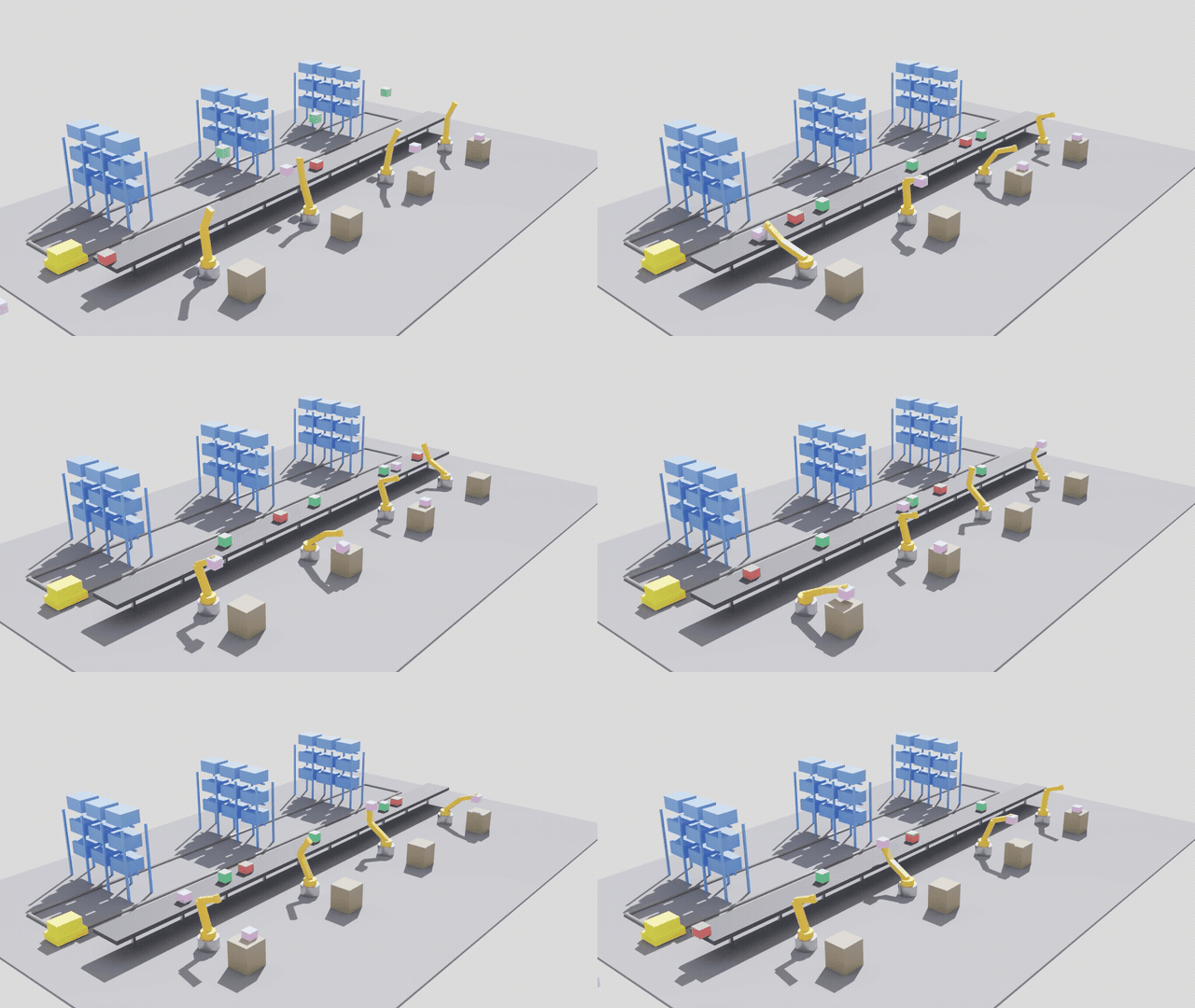
The same USD, path-traced in Isaac Sim 5.1 on an NVIDIA L40S — 97 frames at 64 spp. Nothing here is modelled for the render: the materials, the dome and key lights, the instanced racks and the joint trajectories are the ones the build script authored, finally shaded by the renderer they were written for.
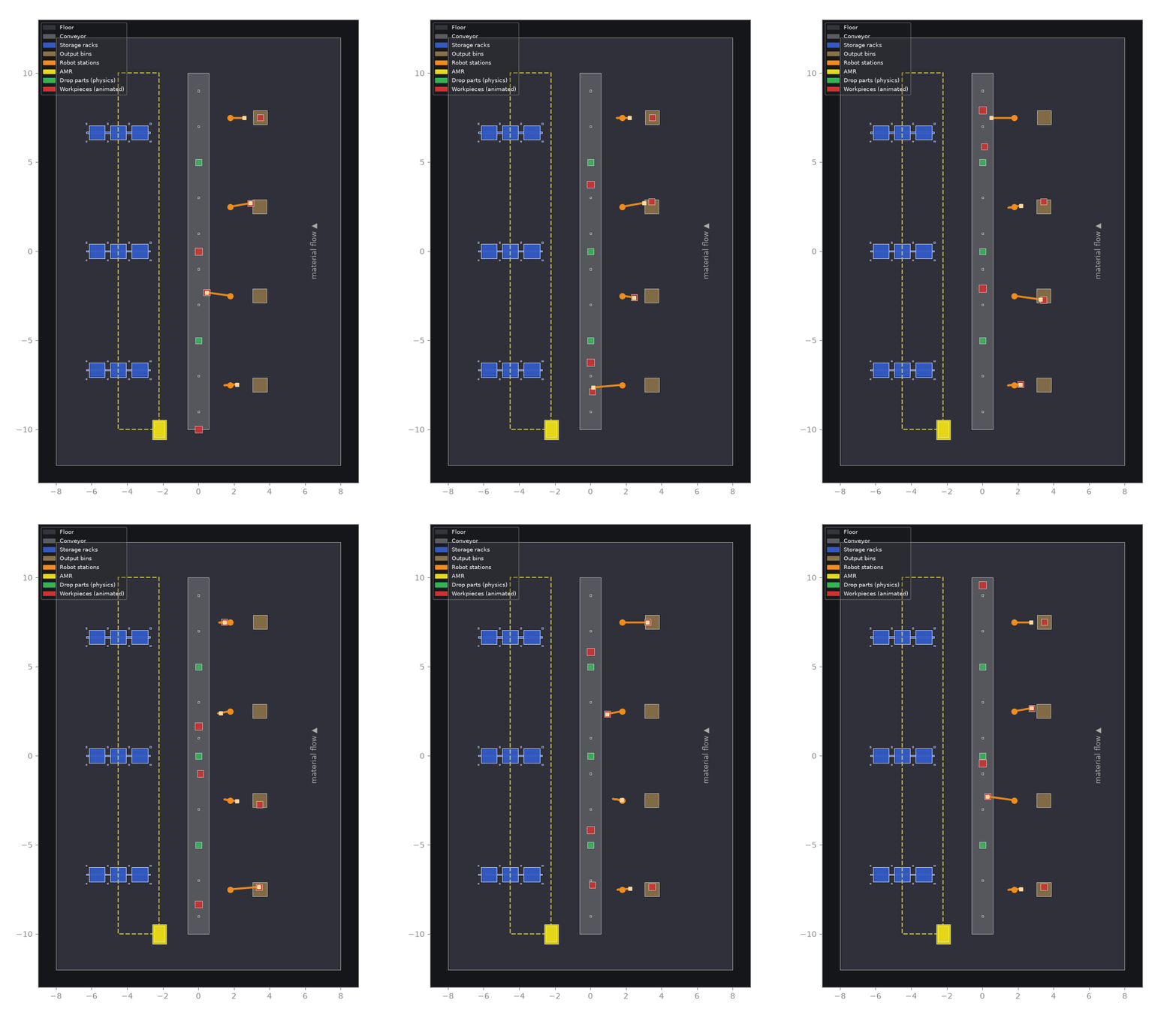
The same eight seconds without a GPU: closed-loop pick-and-place drawn straight from the USD. Each arm (orange, placed by forward kinematics from its time-sampled joint drives) picks a part off the belt and sets it in an output bin, staggered across the four stations. Red = workpieces (riding the belt, then carried to the tan bins); green = dynamic parts that drop in Isaac Sim; blue = instanced racks; yellow = AMR + route.
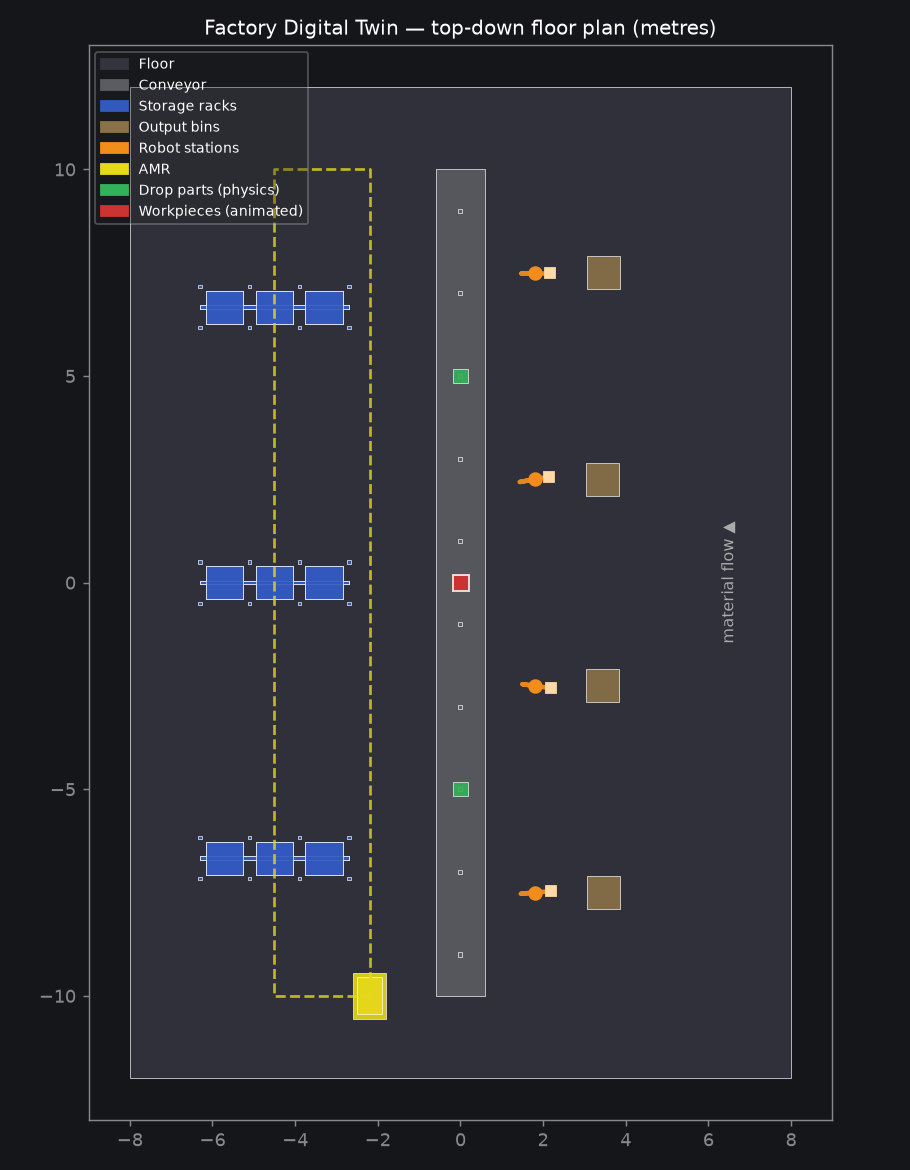
Why this is an Omniverse project without an Omniverse install
Omniverse’s three pillars are OpenUSD (scene description), RTX (rendering) and PhysX (simulation). RTX needs an NVIDIA GPU — but every Omniverse workflow is authored on top of USD, and PhysX is driven entirely by UsdPhysics schemas that live in the USD file. This project builds both layers directly, which is the transferable, portable core skill:
- Stage & scenegraph —
/Worldhierarchy,Xformtransforms, Z-up / metres metadata (the Isaac Sim / robotics convention). - Materials — portable
UsdPreviewSurfacePBR shaders (UsdShade). - Lighting —
UsdLuxdome + distant key light. - Instancing at scale — storage racks are authored once as a prototype
and stamped as
instanceablereferences, the technique that keeps factory/warehouse twins light. - Semantic geometry — the AMR route is a first-class
BasisCurvespath, not a baked mesh, so a nav stack (or Isaac Sim) can consume it. It now does:brev/ros2_bridge.pypublishes it as anav_msgs/Path, alongsidesensor_msgs/JointStatefor the four arms, verified over DDS with the systemros2CLI. - Physics & articulation — the robot arms are real
UsdPhysicsarticulations (see below), so Isaac Sim loads them as drivable robots. - Animation — workpieces are kinematic bodies driven by time-sampled transforms, so the conveyor flow is authored in the file and loops seamlessly.
- Data-driven — the whole plant is generated from a YAML config; no code edits needed to change the layout.
Physics & articulation
Each of the 4 robot arms is authored as a UsdPhysics articulation — a kinematic chain of rigid bodies joined by revolute (hinge) joints — so PhysX in Isaac Sim treats it as one drivable robot instead of loose meshes:
base_link ──fixed──▶ world          (bolted to the floor)
   │ joint0_yaw       revolute · axis Z · ±170°   (turntable)
link0
   │ joint1_shoulder  revolute · axis Y · ±90°
link1  (upper arm)
   │ joint2_elbow     revolute · axis Y · ±150°
link2  (forearm + gripper)
- Global
UsdPhysics.Scenewith Earth gravity (−Z, 9.81 m/s²); the floor is a static collider. - Every link has
RigidBodyAPI+MassAPI; every visual gprim hasCollisionAPI. - Every revolute joint has angle limits and an angular
DriveAPI(stiffness/damping + a target angle) — the actuation Isaac Sim reads to position the arm. - The shoulder and elbow drive targets are time-sampled into a pick-cycle trajectory (phased per robot), so in Isaac Sim the arms actually reach toward the belt and retract on the timeline — the correct way to command a robot (author the joint trajectory, not the link transforms).
Rest pose vs. driven pose: the USD file stores the arm at rest (pointing straight up) and the motion in the joint drive targets. The arm only bends once a solver applies those targets. Isaac Sim does this with PhysX; for the GPU-free GIF,
preview.pyruns forward kinematics on the same joint angles to draw the driven pose. Both read one source of truth — the drive targets — so the preview matches what PhysX produces.
Closed-loop pick-and-place
Each arm runs a full pick cycle: a part rides the belt to the station, the arm picks it up, carries it, and sets it in an output bin on the +X side — the four stations phased so they work in sequence.
The grasp is a baked kinematic pick: the picked part is a kinematic body whose transform is time-sampled to (1) ride the belt, (2) follow the gripper during the grasp window — sampled from the same forward kinematics the arm uses, so the part stays exactly in the hand — and (3) rest in the bin. Because it is kinematic, the pick plays identically in the GPU-free GIF and in Isaac Sim.
Why baked, not a contact grasp: USD has no time-varying parenting, and a physics joint cannot be created/destroyed on the timeline from static USD — true contact-based grasping (attach/detach when the gripper touches the part) needs an Isaac Sim runtime script (a
SurfaceGripperor a scripted joint). That is the natural next step; here the pick is authored and solver-independent.brev/contact_grasp.pytakes that step — a belt with real surface velocity and a realSurfaceGripperon each arm. All four grippers grip their own physically-transported part; the carry is not finished yet, and the write-up says exactly where it stops and why.
Verify the rigging without a GPU:
PYTHONPATH=src python -c "from pxr import Usd,UsdPhysics as P; s=Usd.Stage.Open('output/factory_twin.usda'); \
print('articulations', sum(p.HasAPI(P.ArticulationRootAPI) for p in s.Traverse()), \
'revolute joints', sum(p.IsA(P.RevoluteJoint) for p in s.Traverse()))"
Verified in real PhysX
That check reads the file. To find out what a solver actually does with it,
the scene was run headless in Isaac Sim 5.1 on an NVIDIA L40S
(g6e.xlarge on NVIDIA Brev) — see
brev/ for the harness, the full method, and the report.
| Measured under PhysX | |
|---|---|
| Articulation roots parsed | 4 / 4, 3 DOF each |
| Drive targets outside a joint limit | 0 |
| Shoulder travel on the timeline | 141.0° (authored range 145.6°) |
| Elbow travel on the timeline | 85.2° |
| Steady-state tracking lag | max 5.50°, mean 5.27° |
| Arms holding their authored rest pose | 0.409° worst |
| Drop parts at rest | z = 1.05 m, exactly belt top + half extent |
| Checks passed | 12 / 12 |
So the claim above — that the arms reach toward the belt and retract on the timeline in Isaac Sim — is measured, not assumed.
It did not pass the first time. The solver found a real bug that authoring
alone cannot surface: the kinematic workpieces were shoving the arms off
their commanded pose by up to 20.6° and bulldozing the drop parts 30–56 m
down the line, because a baked grasp authors the carried part inside the
gripper and PhysX treats a kinematic body as infinitely massive. An ablation
pass named the cause, and filtering those parts into their own
UsdPhysics.CollisionGroup fixed it. The write-up in brev/ has the
numbers, the two wrong hypotheses that came first, and what refuted them.
Scene contents
| Asset | Count | Notes |
|---|---|---|
| Conveyor belt | 1 | 20 m, runs along +Y (material-flow direction), collider bed |
| Pass-through parts | 2 | kinematic parts, time-sampled flow along the belt |
| Pick parts + bins | 4 + 4 | picked off the belt by an arm and placed in an output bin |
| Drop parts | 3 | dynamic rigid bodies that fall onto the belt in Isaac Sim |
| Robot-arm workstations | 4 | 3-DOF UsdPhysics articulations, along the +X side |
| Storage racks | 3 | instanceable — 3 bays × 3 levels each |
| AMR + route | 1 | mobile robot with a dashed loop path |
| Lights | 2 | dome + distant key |
All counts, positions, speeds and robot poses come from
config/factory.yaml — edit it and re-run to generate a
different plant.
Quick start
python3 -m venv .venv
source .venv/bin/activate
pip install -e .

# generate the USD scene from the YAML config
factory-twin-build --config config/factory.yaml --out output/factory_twin.usda

# GPU-free previews
factory-twin-preview --in output/factory_twin.usda --out output/floorplan.png   # static PNG
factory-twin-animate --in output/factory_twin.usda --out output/conveyor.gif     # animated GIF
Change the plant by editing config/factory.yaml (line length, part count and
speed, robot count/poses, rack grid, animation fps …) and re-running the build.
Open it in Omniverse (on an RTX machine)
- Copy
output/factory_twin.usda(or.usdc) to a Windows/Linux box with an NVIDIA RTX GPU. - Open it in USD Composer / Omniverse Kit / Isaac Sim — the scene loads with materials and lights already bound.
- Swap placeholder cubes/cylinders for real assets, enable RTX path tracing,
and (next step) add
UsdPhysicsjoints to articulate the robot arms.
Project layout
src/factory_twin/
  assets.py        # reusable USD asset builders (materials, boxes, robot, rack, AMR)
  physics.py       # UsdPhysics rigging: scene, articulated arms, kinematic/dynamic bodies
  kinematics.py    # forward kinematics for the arm (drives the GPU-free preview)
  build_scene.py   # config-driven assembly of the full production line -> .usda
  preview.py       # GPU-free renderers: floor-plan PNG + conveyor-flow GIF
config/factory.yaml  # the layout config that drives build_scene
output/            # generated .usda / .usdc (git-ignored) + sample PNG/GIF (tracked)
Roadmap
UsdPhysicsrigid bodies + revolute joints so the arms articulate in Isaac Sim- Animate workpieces travelling down the belt (time-sampled transforms)
- Parameterise the whole layout from a YAML config
- Conveyor + workpieces as physics bodies (kinematic parts ride, dynamic parts drop)
- Drive the robot joints on a timeline (time-sampled drive targets + FK preview)
- Closed-loop pick-and-place: arms pick parts off the belt into output bins
- A proper 3D isometric preview (currently top-down only)
- Contact-based grasp in Isaac Sim (SurfaceGripper / scripted attach-detach)
Requirements
- Python ≥ 3.10
usd-core— OpenUSD Python runtimepyyaml— reads the layout configmatplotlib+pillow— for the GPU-free PNG / GIF previews only
License
MIT